
Table of Contents >> Show >> Hide
- First, a quick reality check: what “changing your IP” means in Tor
- How to change your Tor IP on desktop (Windows, macOS, Linux)
- How to change your Tor IP on Tor Browser for Android
- How to confirm your Tor IP actually changed
- Common reasons your Tor IP “won’t change” (and what to do)
- Best practices: change IP without accidentally undoing your privacy
- FAQ
- Real-World Experiences: What Changing Your Tor IP Feels Like
- Conclusion
- SEO Tags
If you’ve ever opened Tor Browser, checked “What’s my IP?”, and thought, “Coolnew digital disguise,” you’re not wrong.
But Tor doesn’t work like a VPN where you pick a server and swap IPs on command like you’re changing outfits for picture day.
In Tor, your “IP address” (the one websites see) comes from a Tor exit node, and changing it is really about changing your Tor circuit.
Once you understand that one sentence, everything else gets way less spookyand way more effective.
First, a quick reality check: what “changing your IP” means in Tor
When you browse normally, websites see your public IP (usually tied to your internet provider and location).
When you browse with Tor, websites usually see the IP address of the exit relay (aka the last Tor relay that connects to the open internet).
That exit IP might be in a different city or even a different country, which is why Tor is popular for privacy and censorship circumvention.
Tor circuits, explained like you’re ordering pizza
A Tor connection typically travels through multiple relays (often described as entry/guard → middle → exit).
That route is called a circuit. Your destination site only sees the exit relay’s IP address.
So when people say “change Tor IP,” what they usually want is: “Please give me a different exit relay for this site.”
Why your Tor IP doesn’t change every time you refresh
Tor tries to balance anonymity with usability. If it changed circuits constantly, many sites would break, logins would explode,
and the web would feel like it’s held together by tape (more than it already is).
Tor can reuse circuits for a short period, and some sites keep connections open (which can keep you on the same exit longer).
How to change your Tor IP on desktop (Windows, macOS, Linux)
Tor Browser gives you two built-in, easy buttons that handle 99% of “I need a different IP” situations.
The trick is picking the right one for what you’re trying to do.
Option 1: “New Tor Circuit for This Site” (best for one stubborn website)
Use this when a single site is acting upmaybe you hit a rate limit, got stuck in CAPTCHA purgatory, or the site loads like it’s on a treadmill.
This option requests a new circuit for the current site without wiping everything else.
- Open Tor Browser and go to the site that’s giving you trouble.
- Click the Tor menu (≡) in the top-right corner.
- Select “New Tor Circuit for This Site.”
- The page will reload using a fresh circuit for that destination.
Keyboard shortcut tip (often available): On many systems, Ctrl + Shift + L triggers a new circuit for the current site.
(If it doesn’t work on your setup, the menu option will.)
What to expect: The site may see a different exit IP afterward. Not guaranteed every single time, but it often changes.
Your other tabs and other sites typically remain as they are.
Option 2: “New Identity” (best for a clean slate)
Use this when you want to reduce linkability between “what I was doing before” and “what I’m about to do now.”
This is the big reset buttonthink “new browser session, new circuits, cleared local traces.”
- Click the Tor menu (≡).
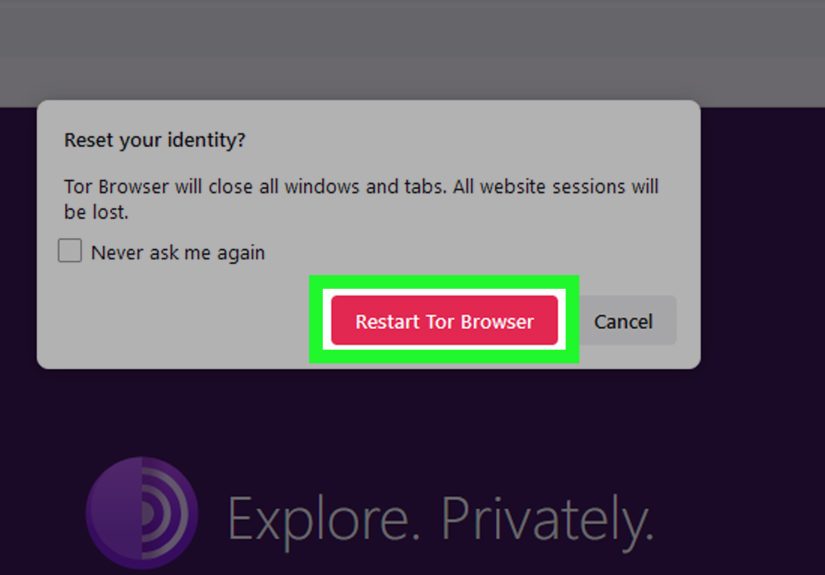
- Select “New Identity.”
- Tor Browser will warn you that tabs will close and activity/downloads will stop.
- Confirm, and Tor Browser will restart your session with new circuits.
What New Identity does: It closes open tabs/windows and clears private data like cookies and history, then uses new circuits.
That’s why it’s usually the most effective “reset everything” option.
Heads-up: If you’re mid-download, mid-form, or mid-anything you care about, finish first.
“New Identity” is not subtle. It’s the browser equivalent of flipping the table and announcing you have entered your “new era.”
Option 3: Close Tor Browser completely and reopen
Sometimes the simplest move works: close Tor Browser, wait a moment, then open it again.
Depending on your situation, this can also result in a new circuit and a different exit IP.
If you’re trying to clear your session state, this can helpespecially if you also avoid restoring previous tabs.
How to change your Tor IP on Tor Browser for Android
On Android, you’ll still see identity/circuit controls, but behavior can vary by version.
In general, changing the circuit is straightforward, but a “full reset” may require closing and reopening the browser.
Try the built-in identity/circuit option first
- Open Tor Browser for Android.
- Open the menu (usually the three dots).
- Look for an option like New Identity or New Circuit.
- Use it to request a fresh circuit.
If you need a “full reset,” restart the app
If you want to reduce linkability (not just change the route), the most reliable approach is usually:
close all Tor Browser tabs, fully exit the app, then reopen it and start fresh.
How to confirm your Tor IP actually changed
The cleanest check is to use Tor Project’s connection-check page inside Tor Browser.
It confirms whether your browser is connecting through Tor and shows the exit IP it sees.
A simple verification routine
- Open the Tor check page and note the IP shown.
- Use New Tor Circuit for This Site (or New Identity).
- Reload and compare the IP.
Important: Some “what’s my IP” sites can be noisymultiple trackers, aggressive scripts, weird geolocation guesses.
If one site says something confusing, double-check with the Tor check page rather than spiraling.
Common reasons your Tor IP “won’t change” (and what to do)
1) You’re changing circuits, but the exit node happens to be the same
Tor can rebuild a circuit and still land on the same exit relay by chanceespecially if you keep trying quickly or your network conditions limit options.
Try again after a short break, or use New Identity if you truly need a broader reset.
2) The site is tracking you without relying on IP
IP is only one “identifier.” Sites can also recognize you through logins, cookies, and browser fingerprinting techniques.
Tor Browser works hard to reduce fingerprinting and isolate state by site, but you can still get recognized if you:
- Log into the same account (the site doesn’t need your IP to know it’s you).
- Reuse identifying information (email, username, unique behavior patterns).
- Keep the same tab/session running for a long time on a site that maintains persistent connections.
If the goal is “stop this site from linking old activity to new activity,” New Identity is usually the better tool than “New Circuit.”
3) A long-lived connection is keeping you “sticky”
Some modern sites use persistent connections (for chat, feeds, or real-time updates).
If a connection stays open, your visible IP for that session may not change just because you refreshed once.
In those cases, fully resetting with New Identity (or closing the site and reopening after a reset) is often more effective.
4) You’re not actually using Tor Browser (or something is misconfigured)
This sounds obvious, but it happens: people open a regular browser window, check IP, and wonder why it shows their ISP.
Make sure you’re using Tor Browser and confirm via the Tor check page.
Best practices: change IP without accidentally undoing your privacy
Tor Browser is designed to be safest when you leave it close to default.
A lot of “extra tweaks” can make you stand outironically making tracking easier.
Do this
- Use built-in controls (New Circuit / New Identity) instead of random scripts or questionable extensions.
- Prefer HTTPS sites so exit nodes can’t read your traffic content.
- Use Security Level settings (Standard/Safer/Safest) if you need stricter protection, understanding some sites may break.
- Keep identities separated: don’t mix real-name logins with anonymous browsing if anonymity is your goal.
Avoid this
- Trying to force specific countries/exits as a default habit (it can reduce anonymity and reliability).
- Installing lots of add-ons (it increases uniqueness, which is not your friend).
- Assuming “new IP = invisible.” (It helps, but it’s not magic.)
FAQ
Can I choose a specific country IP in Tor Browser?
Tor is not built for “pick a country like a dropdown” behavior, and forcing exits can shrink the anonymity set and cause more breakage.
If your goal is privacy, the healthiest default is usually letting Tor choose.
If your goal is accessing a region-locked service, Tor may not be the right tool (and many services block Tor exits anyway).
Should I use a VPN with Tor to change my IP “even more”?
Sometimes people use a VPN with Tor for specific threat models (like hiding Tor usage from a local network).
But it also adds a new party you must trust (the VPN provider) and can complicate troubleshooting.
For most everyday privacy needs, Tor Browser alone is usually the simplest, safest starting point.
Why do sites show endless CAPTCHAs or block me on Tor?
Many sites treat Tor exit IPs as “high risk” because lots of people share them and abuse sometimes comes from those shared addresses.
That’s not you personallyit’s the downside of a privacy tool used by millions.
When it happens, try New Circuit for This Site, or use the site’s onion service if it offers one.
Real-World Experiences: What Changing Your Tor IP Feels Like
In real life, most people don’t wake up thinking, “Today I shall rotate my exit node.” It usually starts with a small annoyance:
a site suddenly loads slowly, your search results get throttled, or a form submission fails with the vague energy of
“something went wrong” (which is the internet’s version of a shrug).
One of the most common experiences is getting stuck in a CAPTCHA loop. You click the little box, you pick the crosswalks,
you prove you can identify a fire hydrant from orbitand the site still says, “Try again.” When that happens, a new circuit
for the site often helps because it gives the site a different exit IP reputation score to judge. Sometimes the next circuit
behaves like a VIP pass. Other times it’s the same party, different hat. That’s normal.
Another frequent scenario: you’re doing legitimate researchmaybe health info, workplace policy docs, or sensitive news
and you don’t want those clicks tied to your normal browsing profile. Here, “New Identity” feels less like “change my IP”
and more like “break the thread.” It’s the moment when you realize Tor isn’t just about the number an IP-check site shows;
it’s also about minimizing the trail of state that links one session to the next. The first time you hit New Identity and it
slams every tab shut, you learn quickly: save what you need first. Tor is very good at privacy, and very bad at babysitting.
People also notice something subtle: even when your exit IP changes, a website might still recognize you if you log in.
This is where expectations get corrected fast. IP rotation is useful for reducing passive location tracking or breaking simple
rate limits, but it doesn’t erase identity if you hand it over with a username and password. A lot of users end up developing
a practical habit: “Tor for browsing, not for being ‘me.’” They keep their personal accounts in normal browsing (or at least
separate profiles) and use Tor for research and privacy-first sessions. That separation is less dramatic than it soundsit’s
basically the digital equivalent of not wearing your work badge to a costume party.
Speed is another common “welcome to Tor” experience. Some circuits feel decent; others feel like your packets are traveling
by scenic route on a bicycle. When performance drops, changing circuits can help because you may land on relays with better
connectivity. But users also learn a second lesson: constantly rotating circuits can make things worse, not better. Many sites
interpret rapid IP changes as bot behavior, which triggers more CAPTCHAs and blocks. The sweet spot is using New Circuit when
you have a reasonlike a page won’t load, a site refuses access, or you suspect the current exit is being throttled.
Finally, there’s the “why does my IP show a weird location?” moment. Geolocation databases are imperfect, and Tor exit nodes
can be labeled in surprising ways. Users often learn to care less about the country label and more about the core goal:
the website should see the exit IP, not your home ISP IP. If that’s true, Tor is doing its job. And if you ever see your real
ISP IP while you believe you’re in Tor Browser, that’s a red flag worth investigating immediatelyusually by re-checking that
you’re actually in Tor Browser and confirming with Tor’s own check page.
Conclusion
Changing your IP in Tor Browser is really about changing your Tor circuit.
For quick fixes on one site, use New Tor Circuit for This Site.
For a bigger privacy reset, use New Identity.
And remember: a new exit IP helps, but your behavior (logins, identifiers, and browsing habits) still matters.
Use Tor thoughtfully, keep it close to default, and you’ll get the privacy benefits without turning your session into a chaotic IP merry-go-round.