
Table of Contents >> Show >> Hide
- Why Hexadecimal Plays So Nicely with Binary
- Quick Ref: Binary-to-Hex Cheat Sheet (One Nibble at a Time)
- Way 1: The Nibble Grouping Method (Fastest and Most Common)
- Way 2: Convert Binary to Decimal, Then Decimal to Hex (Best for Understanding)
- Way 3: Use Tools or Code (Fast, Repeatable, and Great for Real Work)
- How to Double-Check Your Answer (So You Don’t Accidentally Invent a New Number)
- Wrap-Up
- Real-World “Been There, Converted That” Experiences
Binary is the language computers speak. Hexadecimal is the language humans use when they’re tired of counting zeros
like they’re doing inventory at a sock factory. If you’ve ever stared at a long binary number and thought,
“Surely there’s a shorter way to say this,” congratulationsyou’re ready to convert binary to hexadecimal.
In this guide, you’ll learn three practical ways to do a binary to hex conversion, with
step-by-step examples, a cheat sheet, and a few “please don’t do this in production” pitfalls to avoid.
Whether you’re working with networking, memory dumps, color codes, or just surviving a CS homework set,
you’ll walk away able to convert confidently (and quickly).
Why Hexadecimal Plays So Nicely with Binary
Hex (base-16) is basically binary’s best friend because it compresses binary cleanly:
one hexadecimal digit represents exactly four binary bits. Those four bits are often called a
nibble. Two hex digits make one byte (8 bits), which is why you often see bytes shown as pairs like
3F, A0, 7B.
Translation: instead of writing 32 bits as a long string of 0s and 1s, you can write 8 hex digits and keep your
sanity intact.
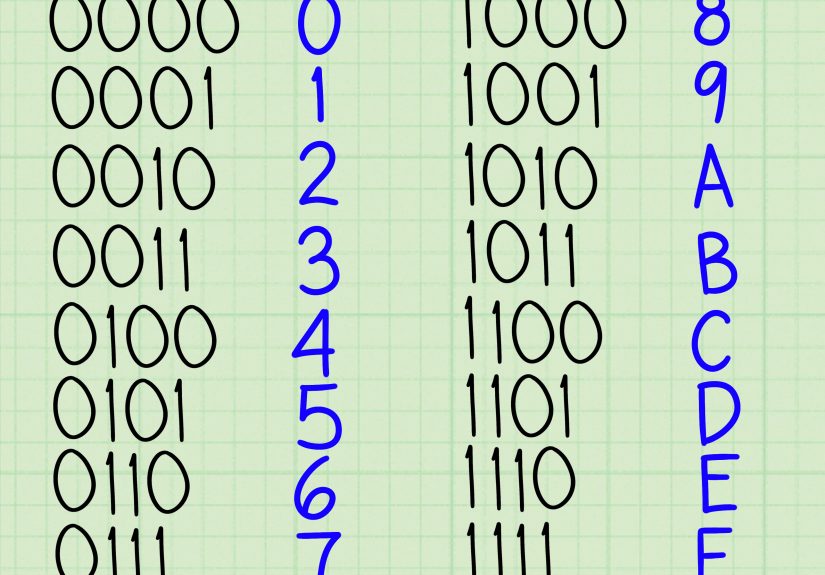
Quick Ref: Binary-to-Hex Cheat Sheet (One Nibble at a Time)
Every hex digit is just a 4-bit pattern. Memorize a few common ones and you’ll start “reading” hex like a second
language.
| Binary (4 bits) | Hex | Decimal |
|---|---|---|
| 0000 | 0 | 0 |
| 0001 | 1 | 1 |
| 0010 | 2 | 2 |
| 0011 | 3 | 3 |
| 0100 | 4 | 4 |
| 0101 | 5 | 5 |
| 0110 | 6 | 6 |
| 0111 | 7 | 7 |
| 1000 | 8 | 8 |
| 1001 | 9 | 9 |
| 1010 | A | 10 |
| 1011 | B | 11 |
| 1100 | C | 12 |
| 1101 | D | 13 |
| 1110 | E | 14 |
| 1111 | F | 15 |
Way 1: The Nibble Grouping Method (Fastest and Most Common)
This is the go-to method because it takes advantage of the “4 bits = 1 hex digit” relationship.
You don’t need to touch decimal at all. You just group bits into sets of four and translate each group.
Steps
- Start from the right side of the binary number (or from the binary point if there’s a fraction).
- Group bits into chunks of four.
- If the leftmost group has fewer than four bits, pad it on the left with zeros.
- Convert each 4-bit chunk to its hex digit using the cheat sheet above.
Example 1: Convert an Integer Binary Number to Hex
Binary: 10001011
Group into nibbles: 1000 1011
Convert each nibble: 1000 → 8, 1011 → B
Hex: 8B
Example 2: Pad with Leading Zeros When Needed
Binary: 1011110
Group from the right: 1 0111 110 (awkward, yes)
Pad the leftmost group to four bits: 0101 1110
Convert: 0101 → 5, 1110 → E
Hex: 5E
Padding zeros doesn’t change the valuethink of it like writing 007 instead of 7. Same number, more dramatic flair.
Example 3: A Longer Number (The “Please Don’t Make Me Count That” Scenario)
Binary: 1101011010111100
Group into nibbles: 1101 0110 1011 1100
Convert: 1101 → D, 0110 → 6, 1011 → B, 1100 → C
Hex: D6BC
Binary Fractions: Convert Both Sides of the Binary Point
If your binary number has a fractional part (binary point), you still group in foursbut you group outward from the point:
groups of four to the left and groups of four to the right. If you run out of bits, pad with zeros on the side you’re extending.
Binary: 1101.011
Left side: 1101 (already 4 bits) → D
Right side: .011 → pad to 4 bits as .0110 → 6
Hex: D.6
Common Mistakes with the Nibble Method
- Grouping from the wrong side: For integers, group from the rightmost bit. For fractions, group from the point outward.
- Forgetting padding: If a group isn’t four bits, pad with zeros (left side for integers, right side for fractions).
- Mixing up A–F: Remember A=10, B=11, C=12, D=13, E=14, F=15.
Way 2: Convert Binary to Decimal, Then Decimal to Hex (Best for Understanding)
This method is slower but great for building intuition. You first convert binary to a base-10 number (decimal),
then convert that decimal number to hexadecimal using repeated division by 16.
Step A: Binary to Decimal (Positional Value)
Each bit represents a power of 2, starting from the rightmost bit as 20, then 21, 22, and so on.
Add up the powers where the bit is 1.
Binary: 11001010
Break it down by place value:
Step B: Decimal to Hex (Repeated Division by 16)
Divide by 16 repeatedly. Each remainder is a hex digit (0–15). The first remainder you get is the least significant hex digit.
Read remainders from last to first at the end.
Decimal: 202
Now map remainders to hex digits:
12 → C and 10 → A.
Read from last to first: CA.
So: 11001010₂ = 202₁₀ = CA₁₆
When This Method Helps
- You’re learning number systems and want the “why,” not just the “how.”
- You need to show work step-by-step for an assignment or documentation.
- You’re dealing with unusual groupings and want a sanity check.
Way 3: Use Tools or Code (Fast, Repeatable, and Great for Real Work)
If you’re converting binary to hexadecimal often (or you value your remaining keyboard lifespan),
tooling is the most practical route. The key is to understand enough to validate resultsbecause copying
the wrong value into a config file is a thrilling adventure you did not sign up for.
Option A: Programmer Calculators and Converters
Many calculators and online utilities can convert binary to hex instantly. These are great when:
- You need a quick conversion once or twice.
- You’re checking homework or verifying a manual conversion.
- You’re working with long binary strings and want to avoid human error.
Pro tip: if the tool lets you choose grouping or bit-width, set it intentionally (8, 16, 32 bits, etc.).
Otherwise, leading zeros might disappearand sometimes those zeros matter for formatting or fixed-width fields.
Option B: Short Code Snippets (Perfect for Automation)
Here are a few common ways developers convert binary to hexadecimal in code. Use these when you’re parsing input,
debugging, writing scripts, or transforming data at scale.
Python
JavaScript
C (Using strtol)
Notice how these approaches all share the same idea:
parse the binary as base-2 → format the result as base-16.
That’s the “grown-up” version of Way 2, minus the long division.
Option C: Formatting and Byte-Friendly Output
When you’re dealing with bytes, it’s common to print hex in pairs (00 to FF). That’s how packet analyzers,
hex editors, and debug logs stay readable. A common convention is to show hex with a prefix like 0x
and pad with leading zeros to a fixed width.
If you’re logging or exporting data, decide upfront whether you need:
uppercase vs. lowercase, prefix vs. no prefix, and fixed width vs. minimal.
Consistency prevents confusion later (and makes your future self slightly less likely to hold a grudge).
How to Double-Check Your Answer (So You Don’t Accidentally Invent a New Number)
- Reverse it: Convert the hex back to binary by translating each hex digit into 4 bits. If you get the original binary (plus padding zeros), you’re good.
- Spot-check with Way 2: Pick one example and confirm by converting through decimal.
- Use a tool: Especially for long values or when the output must be exact (network fields, masks, checksums).
Wrap-Up
Converting binary to hexadecimal doesn’t have to be a ritual involving crossed fingers and whispered prayers to the
gods of base conversion. You’ve got three reliable methods:
- Way 1 (Nibble grouping): Fastest and most commongroup into 4s, translate to hex.
- Way 2 (Through decimal): Best for learningbinary to decimal, then decimal to hex via division by 16.
- Way 3 (Tools/code): Best for real workrepeatable, scalable, and less error-prone.
Once you get comfortable, you’ll start seeing hex everywhere: memory addresses, RGB colors, file headers,
permissions masks, and anything else that wants to be “binary, but readable.”
Real-World “Been There, Converted That” Experiences
People usually learn binary-to-hex conversion in one of two emotional states: curiosity (“cool!”) or mild panic
(“my lab is due in 40 minutes!”). Either way, the moment it really clicks is when you see it in the wild and
realize hex isn’t just a classroom party trickit’s a working adult with a job and benefits.
A common “aha” moment happens in debugging. Someone prints a value and it comes out as a long binary string,
which is technically accurate and also technically rude. Converting that binary into hex instantly makes it easier
to read in chunks: you stop scanning individual bits and start scanning meaningful groups. That’s why you’ll see
developers log data as hex pairsespecially for bytesbecause “8B” is recognizable at a glance while
“10001011” makes your eyes do extra laps.
Networking is another frequent conversion hotspot. Packet fields are often documented in bits, but tools display
them in hex. If you’ve ever looked at a header field and wondered why it’s written as two hex digits, that’s the
nibble/byte relationship showing up in real life. Once you’re fluent, you can move between “bit-level truth” and
“human-readable hex” without losing context. It’s like being bilingual, except the languages are “beep boop” and
“still beep boop, but shorter.”
Then there’s the “leading zeros matter” lesson, which most people learn the hard way. In many technical settings,
a value is expected to be a specific width. For example, a byte should be two hex digits. If a converter tool drops
a leading zero, the value might still be numerically correctbut it may no longer match the required format. That’s
how you end up with mismatched checksums, weird parsing errors, or that one teammate saying, “It works on my machine,”
while your machine quietly considers a career change.
One more experience that comes up often: signed vs. unsigned interpretation. Hex (and binary) can represent raw bit
patterns, but the “meaning” depends on context. The same bits can be a positive integer, a negative integer in two’s
complement, or even part of a floating-point number. When someone says, “This hex value is negative,” what they
really mean is “we’re interpreting these bits using a signed format.” Learning to ask “what type is this supposed
to be?” saves timeand prevents you from doing a perfectly correct conversion that answers the wrong question.
Finally, the best practical habit is to build a tiny mental library of common nibble patterns. You don’t have to
memorize every mapping forever, but recognizing a few like 1111 → F, 0000 → 0,
1010 → A, and 1101 → D speeds things up dramatically. Over time, you’ll stop “converting”
and start “reading.” That’s when binary-to-hex goes from a task to a toolsomething you can use on demand without
it feeling like homework.